The week is scattered
Hours live in messages and a paper diary. The app keeps each shift on a calendar, with the client, the time, and the place.
For independent support workers
Manage shifts, clients, invoices and more in one app. Built in Australia for iPhone, iPad, and Android. There is no website to log into.
14-day free trial for eligible new subscribers. Apple or Google bills the plan you choose after the trial, unless you cancel in that store. Prices are in AUD. This website does not take card details.
“Everything I need in one place. Perfect for any independent Support Worker - clients, hours, notes, invoices... all sorted, ready to go. Highly recommended...”
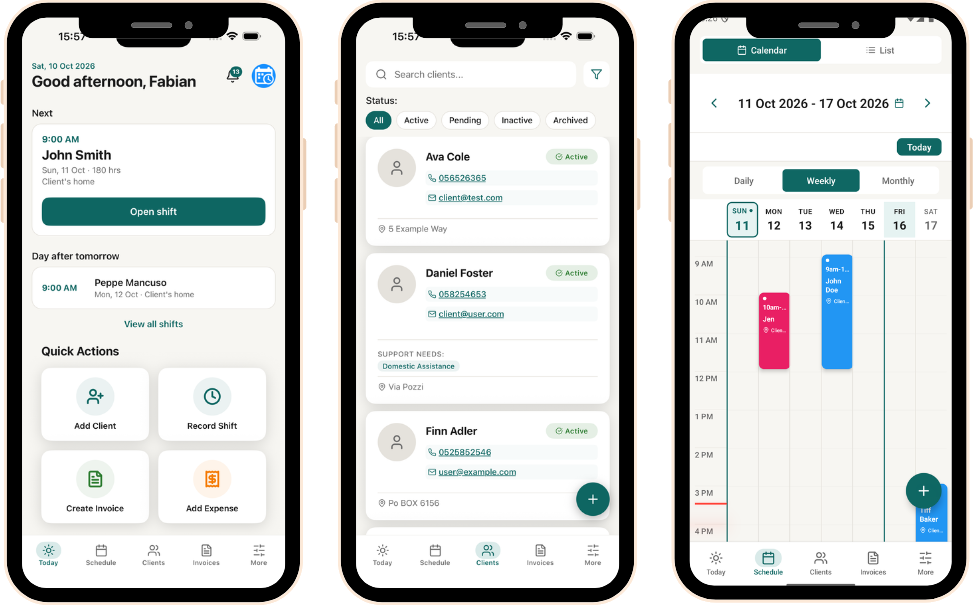
Example screens. Names and contact details shown are demonstration data.
Developed in Australia
For independent support workers
Email support
iPhone, iPad, and Android
Shift Hub Pro keeps the week, the notes, and the invoices on the phone you already carry.
Hours live in messages and a paper diary. The app keeps each shift on a calendar, with the client, the time, and the place.
Complete the shift in the app and write what happened while it is still fresh. The notes stay on that shift and can go into a client report.
The hours, the NDIS line item, and the kilometres are already on the shift. The invoice is built from that, then emailed as a PDF.
Three short recordings of the current app. Press play, or read the description underneath.
Add the client, the times, a repeating pattern, and your rate. Overnight shifts stay marked as overnight.
The recording shows a new shift being added in Shift Hub Pro: choosing the client, setting the start and end time, and saving the shift. It is a demonstration of the app, not a client’s real record.
Write the notes when the shift is done. They stay with that record, and they can be included in a report.
The recording shows a shift being completed, with notes added on that shift. Notes in the app are typed. A client report can include them and be exported as a PDF.
Build the invoices from completed shifts, open the PDF, and email them to the plan manager.
The recording shows invoices built from completed shifts, the PDF, and the step that emails them. The app does not look up the NDIS price guide. You enter the rate.
Each of these is in the current iPhone, iPad, and Android app. There is no separate website to log into.
Weekly, fortnightly, or monthly repeats. NDIS line item and your own hourly rate. Kilometres on the same shift.
Create the agreement in the app from the built-in template, email it for signing, and keep it stored on that client.
Professional invoices from completed shifts, with NDIS line items. Record a payment, or void a sent invoice.
Notes stay on the shift. Reports filter by client and date, then export as a PDF.
Receipts and categories for the costs of the business, ready for a report.
Shift Hub Pro is an independent app. It is not an NDIA or NDIS Commission service, and it does not approve claims or set NDIS prices. You choose the line item and enter the rate.
Install Shift Hub Pro from the App Store or Google Play. It runs on iPhone, iPad, and Android.
Eligible new subscribers get 14 days. The store shows the price before you confirm. Apple or Google handles the subscription, including whether a payment method is needed.
Add a client, then record the shift, the note, and later the invoice, from the same app.
After the trial, the plan renews at the standard price unless you cancel in the App Store or Google Play.
For independent support workers who are not already subscribed. Claim a one-time code for 2 months of Shift Hub Pro free. Ends 23 Nov 2026 or when codes run out.
This promotional code offer has ended. You can still download Shift Hub Pro from the App Store or Google Play.
Terms: Limited campaign. Codes are unique and subject to Apple / Google eligibility. After the promotional period the subscription renews at the then-current price for that plan unless cancelled in the App Store or Google Play. Prices are in AUD. This website does not take card details.
Independent support workers using an iPhone, iPad, or Android phone. It is not built as an agency roster. There is no website login.
Clients, shifts, notes, invoices, and expenses are stored in Google Firebase in Australia. Only your signed-in account can read them. You can export invoices and client reports as PDFs, and you can delete the account from Profile, then Danger Zone, then Delete Account. The privacy policy sets out the service locations and how long backup copies are kept.
No. It is an independent app operated by Xrossly. It is not affiliated with, endorsed by, or connected to the NDIA or the NDIS Quality and Safeguards Commission. It includes NDIS line items so you can label a shift. You enter the hourly rate and any rate per kilometre. It does not look up the NDIS price guide, approve a claim, or guarantee compliance.
Eligible new subscribers can start a 14-day free trial in the App Store or Google Play (separate from promotional offer codes). Standard prices are $12.99 a month or $99.99 a year (AUD). A limited 2 months free code campaign is also available for new subscribers (not existing Pro subscribers) while codes last — that offer is 2 months free only and does not add a 14-day trial on top. Apple or Google shows the price and whether a payment method is required before you confirm. This website does not take card details. Cancel in the App Store or Google Play. After any promotional period it renews at the standard price for that plan unless cancelled.
You can email an invoice PDF to a plan manager, and you can export a client report as a PDF. A service agreement is created in the app from the built-in template, emailed for signing, and stored on that client. The app does not currently publish a connection to accounting or rostering software.
Email support@shifthub.com.au from the app, or info@shifthub.com.au from this website. There is no published response-time promise.
iPhone, iPad, and Android. Eligible new subscribers can start the 14-day trial in the store. The price is shown before you confirm.


Questions about the app, or the 2 months free offer. Write to info@shifthub.com.au, or use the form.
Support from inside the app goes to support@shifthub.com.au.